One of the advantages of factory patterns is the flexibility they provide in terms of declaring the information required to instantiate a factory. Some of the ways this can be done using C# and .Net are:
- User input/ logical condition
- Application settings
- Config file app settings
- Config file custom section
- Database
In this post we will look at some of these methods and also discuss how the DbProviderFactories decides which DbProviderFactory to instantiate.
Please note, if you want to understand different factory patterns, please visit Factory Patterns in C#. In fact, i would suggest you have basic understanding of factory patterns before reading further. It is not mandatory though as the methods discussed here are general .Net features adopted for factory pattern instantiation.
So, lets get started.
To take our discussion forward, i am using the sample abstract factory application that i had created for the Factory Patterns in C# post. You can find the code in my Github. Below is a quick look at the various interfaces and classes we will come across in this post.
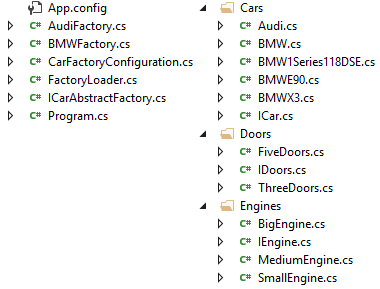
Here,
- ICarAbstractFactory is the interface that defines factory operations.
- AudiFactory and BMWFactory are concrete factories which create ICar objects (Audi, BMW) which are made of IEngine and IDoors objects.
- Program.cs is the program entry class as well as our client.
- FactoryLoader class loads the factory mentioned in App.config app settings or custom section.
- CarFactoryConfiguration represents the custom config section in App.config. We will come to this.
User input/ logical condition
This is the most straight forward way of instantiating a factory. The decision to instantiate which factory can be taken based on some user input or some logical condition in the code.
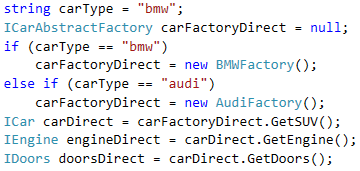
Here we simulate the user input by declaring carType as bmw and instantiating BMWFactory based in the if/ else.
Config file app settings
We can declare a key value pair, as part of the config file app settings, which will define the type of factory to instantiate. In our case we have added an app setting with key CarFactory in the App.config.

The client looks like below:

Here, LoadFromAppSettings static method of the class FactoryLoader gets the value of app setting CarFactory and instantiates an object of class AudiFactory using reflection.

Please note, for simplicity, we have given the full name of our factory class as CarFactory app setting value. If we want we can give any other identifier (e.g. audi) and then use reflection to find the correct factory class for instantiation.
Config file custom section
One of the very useful ways of declaring the factory we want to instantiate is by declaring a custom section in the config file.

We can declare a custom section in the config file using the sectionGroup tag, carFactories in our case. In that, we declare a section, carFactory and the type that corresponds to the custom section. In our case CarFactoryConfiguration.

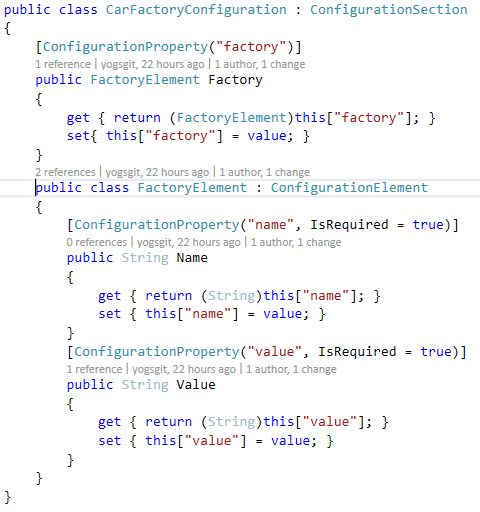
The next step is to declare the actual values for our custom section in its own tags. Here carFactories tag is our sectionGroup and carFactory is our section. factory tag defines the properties, name and value, a user needs to set. We have a property Factory corresponding to the factory tag in the CarFactoryConfiguration class. name and value have their corresponding properties in the class FactoryElement which is represented by the property Factory in the configuration section class CarFactoryConfiguration. This approach is helpful if we need to supply more parameters for factory instantiation, as we can add more properties to the factory tag.
If you want to learn more about the custom config sections, please refer MSDN.
The client code looks like below:

Here, LoadFromCustomSettings static method of the class FactoryLoader gets the value of factory to be instantiated from the App.config‘s custom section carFactory and instantiates an object of class BMWFactory using reflection.

Usage Scenarios
Now, by looking at the config file based approaches, you might have thought that what’s the point of having different factories if we already know which is the only one the application will ever use. Consider some usage scenarios:
- If your application needs to instantiate different factories for different conditions, use the first approach of logical condition. In our example, we may need to instantiate the AudiFactory if an order is raised for Audi and BMWFactory if for BMW.
- If an installation of an application requires only one factory, config approach is useful. Consider our application is used by 2 agencies, one dealing in Audi and the other in BMW. The config file of the application installation of the agency dealing in Audi will have values for AudiFactory instantiation. Similarly, the BMW agency’s application’s config will have values for BMWFactory instantiation.
- If factory instantiation values are declared in config, it becomes easy to replace a factory with another. If our agency dealing in BMW stops doing so and instead starts dealing in Audi, we can simply change the factory instantiation values in the config.
- If a new factory has to be added, it can be easily done by adding in config file. If the solution is designed properly, no code changes may be required. If our agency dealing in BMW starts dealing in Audi, we can add a section for AudiFactory to the config file. Now if the application is designed to select factory instantiation values from the config based on the name property (see our e.g. above) it can use the same factory instantiation code without any change. (our e.g. has factory name hard coded and won’t work).
Real life example – .Net DbProviderFactory
The most famous example in .Net of factory implementation is the DbProviderFactory/ DBProviderFactories. They are part of Ado.Net and are contained in System.Data.Common namespace.

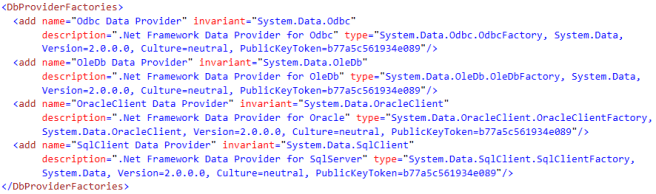
The DbProviderFactories implement Simple Factory Pattern and returns a DbProviderFactory object based on the passed provider invariant name. DbProviderFactory implements Abstract Factory Pattern and creates various objects. In the above code snippet, the overload of GetFactory used expects providerInvariantName as input, which in this case is System.Data.SqlClient. It then checks the <DbProviderFactories> tag inside the <system.Data> tag of the application config file to find the factory details denoted by the invariant name System.Data.SqlClient. If it doesn’t find the required factory details or the <DbProviderFactories> tag there, it searches the machine.config file for the <system.Data> tag, where the default factories are defined. When i checked my machine.config i found the below:
Now, let us see how to add our own DbProviderFactory. To create our new factory we can create a new class and extend it from the abstract class DbProviderFactory.
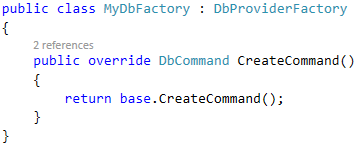
Now to use our MyDbFactory in an application, we need to add its details to the <DbProviderFactories> inside the <system.Data> tag of the application config file. No need to add it to the machie.config as the application config takes precedence over it.
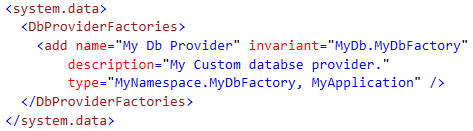
The complete implementation of a custom db provider involves a few more things and is beyond the scope of this post. This is more representational to give an idea as to how .Net implements factories to help you implement your own.
Note
- The code for the factory instantiations shown in this post can be found in my Github.
- For a read on different factory patterns refer Factory Patterns in C#.

 Code, Design, etc.
One thought on “Factory Pattern Instantiations”